Run your faction
like a pro.
b0torn is a Discord bot built for Torn factions. Get ranked war reports with fair payouts, a banking system for vault withdrawals, war rollcall, opponent scouting, and more. No coding or servers needed — just add the bot and go.
🏦 Banking
/bank balance
Check how much money you have stored in the faction vault.
/bank withdraw
Request a withdrawal from the vault. A banker will be pinged and can send your money with one click.
/bank register-reimbursement
Bought something for the faction? Submit an expense to get paid back. A ticket will be created for leadership to review.
📋 War Rollcall
Open the rollcall link
When a war is coming, the bot posts a rollcall in Discord with a link to a web page.
Pick your availability
Select your name, choose "I'm in", "Self Hosp", or "Need Bounty", and optionally leave a comment.
Termed wars
If the war is termed, the page switches to a med-out partner picker instead. Choose a partner from the opponent faction so everyone can coordinate.
🔍 Member Lookup & Activity
/member lookup
Score any Torn player from 0–100 across 10 categories like attacks, OCs, networth, and more.
/member activity
See how active a faction member has been over the last 7 days — war hits, chains, OCs, and online presence.
What's in the report?
Attacks, respect gained/lost, assists, and net score for every member.
Choose how to split the money. Every dollar is accounted for — no rounding errors.
See who took Xanax from the armory before and during the war, plus cost estimates.
Commands
/war-report run Generate a war report
Everyone
Creates a full ranked war report and uploads the spreadsheet to Discord. You need to tell it when the war started and ended.
/war-report set-payment-mode Choose how payouts are calculated
Everyone
Pick how the money pool gets divided between members:
/war-report set-total-payment Set the money pool to split
Everyone
Set the total amount of money that will be divided among members, e.g. 25000000 for $25M.
/war-report set-min-respect Set a minimum respect threshold
Everyone
Only count hits that earned at least this much respect. Useful for filtering out low-effort attacks.
/war-report set-assist-payment Configure assist payouts
Everyone
Choose how to reward members who assisted on attacks:
/status See your current settings
Everyone
Shows all bot settings for your server — faction info, war report settings, banking, rollcall, and subscription status. Works in any channel. Your API key is never shown.
BulkPay Userscript — pay members fast
After generating a report, use this browser script to speed up payments on torn.com. You still confirm every payment manually — it just auto-fills the next one.
Install the script
Click the button below. Requires Tampermonkey (Chrome/Edge) or Violentmonkey (Firefox).
Go to Faction → Controls → Give money
Open the give-to-user page on torn.com.
Paste the payment list
Copy the JSON from the war report spreadsheet and paste it into the BulkPay panel.
Confirm each payment
Click Torn's CONFIRM button. After each one, the next payment loads automatically.
What it looks like
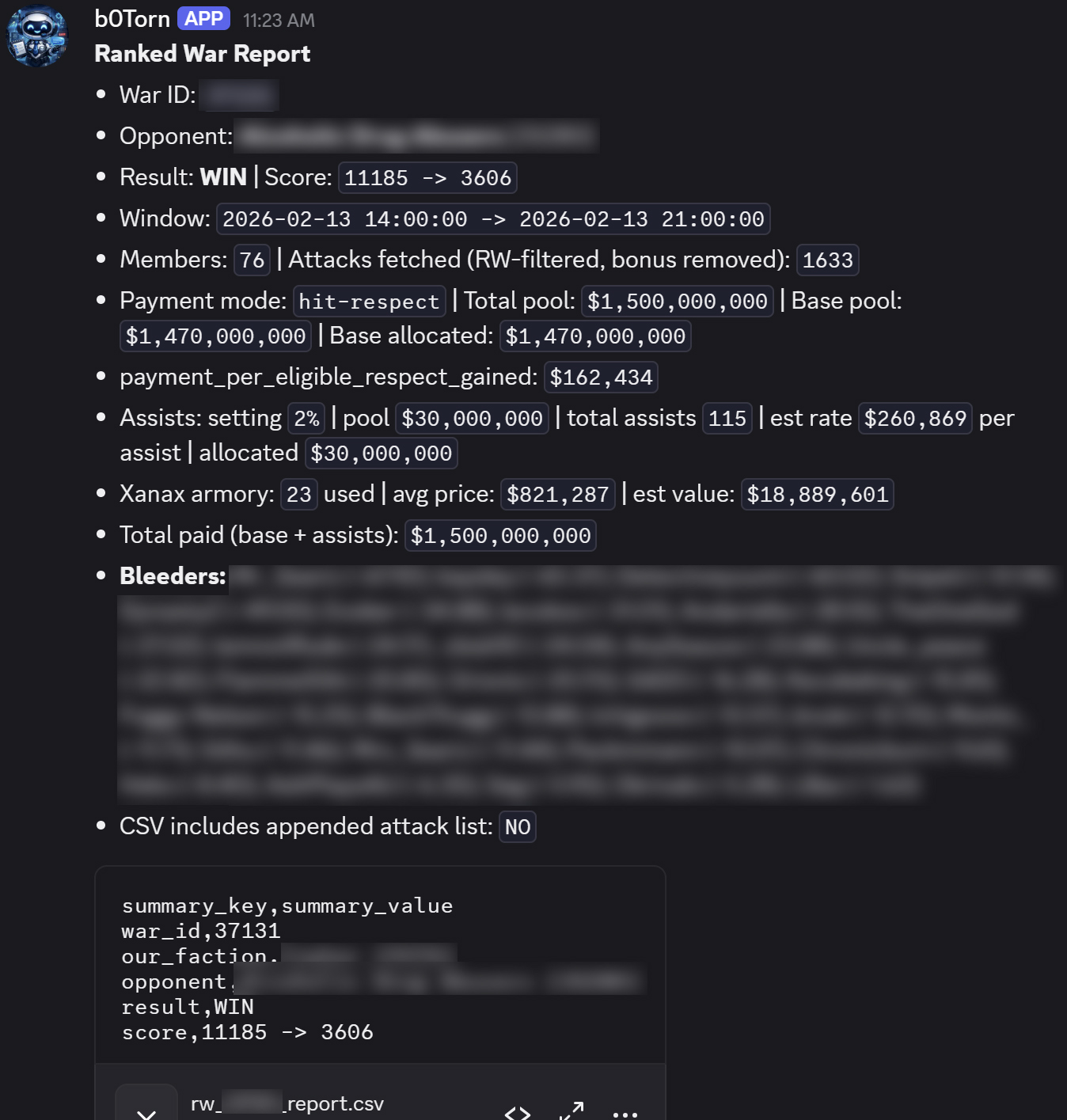
War summary with stats.
Turn the panel on/off.
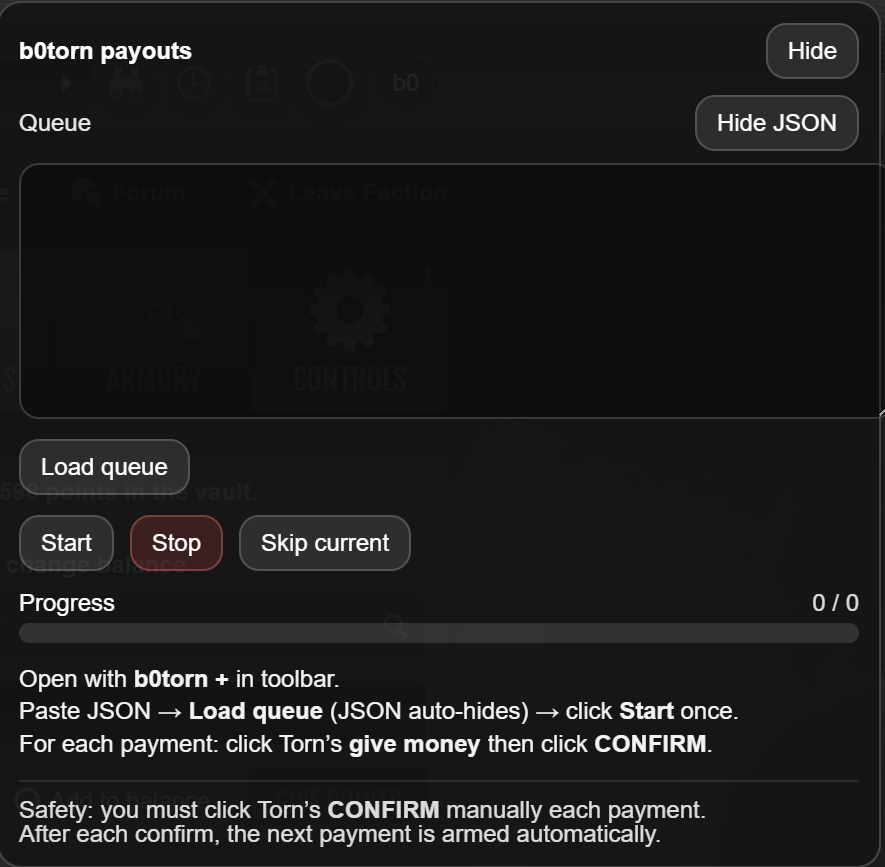
Paste payouts, confirm payments.
How it works for members
Check your balance
Type /bank balance to see how much you have in the vault.
Request a withdrawal
Type /bank withdraw — you can specify an amount or leave it blank for everything.
A banker gets pinged
Your request shows up in the banking channel and the banker role gets notified.
How it works for bankers
Get notified
When someone requests money, you'll see it in the banking channel.
Click "Fulfill"
A link opens torn.com with the member and amount already filled in.
Request updates
The message in Discord changes to show it's been fulfilled.
Commands
/bank balance Check your vault balance
Everyone
Shows how much money you have in the faction vault. Your Discord account needs to be linked to Torn.
/bank withdraw Request money from the vault
Everyone
Sends a withdrawal request to your faction's bankers. They'll get a notification and can fulfill it with one click.
/bank register-reimbursement Submit an expense for the faction to pay back
Everyone
Did you buy something for the faction? (OC items, bounties, supplies, etc.) Submit it here and a private ticket will be created for you and the bankers.
/admin set-banker-channel Choose where banking requests appear
Admin only
Run this in the channel where you want withdrawal requests to be posted. Bankers will see all requests there.
/admin set-banker-role Choose which role gets pinged
Admin only
Set the Discord role that should be notified when someone requests a withdrawal or reimbursement.
/faction members online Who's online right now
Everyone
Lists all faction members currently online, sorted alphabetically.
/faction members offline Who's offline
Everyone
Lists all faction members currently offline.
/faction members okay Who has "okay" status
Everyone
Lists all members with the "okay" status — ready for action.
/faction members flying Who's traveling or abroad
Everyone
Lists all members who are currently traveling, flying, or abroad.
/faction members hospital Who's in hospital
Everyone
Lists all members currently in the hospital.
/faction members revivable Who can be revived
Everyone
Lists everyone who can be revived right now. If a member has a linked Discord account and is in the server, they'll be pinged in the output. May take up to a minute for large factions.
/faction members inactive Who hasn't been active
Everyone
Lists members who haven't done anything in Torn for a while. Great for finding members who might need a check-in.
/faction members discord Who's missing from Discord
Everyone
Shows which faction members aren't in your Discord server. Gives a summary of how many are linked, in server, and missing. May take up to a minute for large factions.
/faction crimes missing-members Who's not in an OC
Everyone
Lists faction members not currently in any Organized Crime. Members with Federal status are automatically excluded.
Individual Member Tools
/member lookup Faction-value score for any player
Everyone
Score any Torn player from 0–100 based on 10 categories like level, attacks, OCs, networth, and more. Great for evaluating recruits. Takes a few seconds to gather data.
/member activity Activity report for a member
Everyone
See how active a faction member has been — war hits, chains, OCs, and online presence over the last 7 days, with a trend indicator showing if they're improving or declining.
How rollcall works
Before a ranked war, the bot posts a message where members can click a button to say if they're available. Leadership can then see exactly who's in.
Ready to fight
Can't participate
Needs to be put in hospital
💬 Comments
Members can leave an optional comment when they respond — for example "Available after 20:00 TCT" or "On holiday until Friday". Comments show up in the rollcall table for leadership to see.
⚔️ Termed Wars & Med-Out Partners
If leadership marks a war as termed (a pre-arranged outcome), the rollcall page switches to a completely different mode. Instead of voting "I'm in" or "Need bounty", members only see a dropdown to pick their med-out partner from the opponent faction. The bot also posts an announcement in the rollcall channel telling everyone the war is termed and to check the newsletter for details.
Commands
/war-tools send-rollcall Start a rollcall for the upcoming war
Everyone
Posts an interactive message with buttons so members can confirm their availability. Shows a live count as people respond.
/war-tools rollcall-report See who responded and who didn't
Leadership
Generates a summary: who's in, who needs bounty, and — most importantly — who hasn't answered yet.
/war-tools activity See when the enemy is active
Everyone
Shows a visual chart of when the opponent faction is most active over the last 100 hours. Helps you figure out their timezone and plan attacks for when they're sleeping.
Rollcall settings (admin)
/admin auto-rollcall Turn automatic rollcalls on or off
Admin only
When enabled, the bot will automatically post a rollcall before ranked wars — no need to trigger it manually.
/admin set-rollcall-channel Choose where rollcalls appear
Admin only
Set which channel rollcall messages are posted in.
/admin set-leadership-role Choose which role gets pinged for rollcalls
Admin only
Set the role that gets notified when a rollcall is posted (e.g. "Leadership", "War Council").
/admin set-termed-war Mark the current war as termed (pre-arranged)
Admin only
When a war is "termed", both factions agree on the outcome beforehand. Enabling this switches the rollcall web page to med-out partner mode — the availability voting is replaced with a dropdown where each member picks their partner from the enemy faction. The bot also announces in the rollcall channel that the war is termed.
Add the bot to your Discord server
Click the "Add to your Discord" button at the top of this page. Pick your faction's server and confirm.
Enter your Torn API key
Type /admin set-api-key and paste your Torn API key. This lets the bot access Torn data for your faction.
Pick a channel for war reports
Go to the channel you want and type /admin set-war-report-channel. Reports will only work in that channel.
Set up banking (optional)
Go to your banking channel and type /admin set-banker-channel, then /admin set-banker-role to choose which role gets pinged for withdrawals.
Configure payouts (optional)
Customize how war payouts work with these commands:
/war-report set-payment-mode — how to split the money
/war-report set-total-payment — how much money to split
/war-report set-assist-payment — whether to pay for assists
Set up rollcall (optional)
/admin set-rollcall-channel — where rollcall messages appear
/admin set-leadership-role — who gets pinged
/admin auto-rollcall — turn automatic rollcalls on/off
/admin set-termed-war — mark a war as termed (enables med-out partner picker)
You're all set!
Generate your first report with /war-report run or check your faction with /faction members online.
Multi-Faction Families
If your faction has a family — multiple factions under the same leadership — you can manage them all from one Discord server. Every feature (rollcall, war reports, activity tracking, member commands) works independently per faction. When you run a command, you can pick which faction to target.
/admin set-api-key <key>That's it — the bot is ready. All commands use this faction automatically.
/admin add-faction <key> Main/admin add-faction <key> Academy/admin add-faction <key> FarmEach faction gets its own label. The first one added becomes the primary.
Family Commands
/admin add-faction <api_key> <label> — Add a faction with a label (e.g. "Main", "Academy")/admin remove-faction <faction> — Remove a faction by label or ID/admin set-main-faction <faction> — Change which faction is the default for all commands/admin list-factions — Show all factions and which is primary
faction: parameter with autocomplete. If you don't specify it, the primary faction is used. Example: /war-report run start:... end:... faction:Academy
Who can use what?
War reports, banking, member lists, rollcall, activity charts, OC tracking, and status checks.
Setting the API key, choosing channels and roles, configuring rollcall automation. Requires "Admin" or "Manage Server" in Discord.
Rollcall reports (seeing who answered). Requires "Admin" or "Manage Server" in Discord.
What the bot needs from Discord
The invite link already requests the right permissions, but if something isn't working, make sure the bot has these in the channels it uses:
Subscription
Free trial
Every faction gets 7 days free starting from the first time you use the bot. No payment info needed.
After the trial: 1 Xanax per week
Send Xanax to B0rjara [2799302] with the message "b0torn". You can send multiple Xanax at once for multiple weeks.
Automatic activation
Payments are detected automatically — no need to message anyone or wait for manual activation.
All admin commands at a glance
/admin set-api-key Connect the bot to your faction
Admin only
Paste your Torn API key. This is required for everything — war reports, banking, member lists, etc. The key is stored securely and never shown.
/admin set-war-report-channel Lock war reports to one channel
Admin only
Run in the channel you want. All war report commands will only work there.
/admin set-banker-channel Set the banking channel
Admin only
Run in the channel where banking requests should appear.
/admin set-banker-role Set who gets pinged for banking
Admin only
Choose the Discord role that gets notified for withdrawal and reimbursement requests.
/admin set-rollcall-channel Set the rollcall channel
Admin only
Choose where rollcall messages are posted.
/admin set-leadership-role Set who gets pinged for rollcalls
Admin only
Choose the role that gets notified when a rollcall is posted.
/admin auto-rollcall Turn automatic rollcalls on/off
Admin only
Enable = the bot posts rollcalls before wars automatically. Disable = manual only.
/admin set-termed-war Mark war as termed
Admin only
Switches the rollcall to med-out partner mode and announces in the rollcall channel that the war is termed.
March 2026
New: /member lookup — Score any Torn player from 0–100 across 10 categories to evaluate recruits.
New: /member activity — Activity report based on hourly tracking: war, chain, OC, and online presence with trend indicators.
Improved: /faction members revivable — Now pings the member's Discord account if they're in the server.
Improved: /faction members revivable — Now shows all revivable members, not just those in hospital.
Improved: /faction members discord — More reliable detection of linked Discord accounts.
Improved: /faction members inactive — Default changed from 7 days to 1 day.
Improved: /faction crimes missing-members — Now checks all OC states and excludes Federal members.
Improved: /member lookup — Replaced "Forum Activity" category with "Active Streak" (forum data not available via API). Removed bounty penalty.
Improved: /faction members revivable & discord — Now use a shared data cache for near-instant results instead of individual API calls per member.
Improved: 1-hour pre-war reminder now includes a list of all revivable members with Discord pings.
Improved: 1-hour pre-war reminder is now skipped for termed wars (no leadership ping needed).
New: /admin add-faction — Multi-faction family support. Manage multiple factions from one Discord server with labeled factions and a faction: parameter on commands.
New: /admin list-factions, /admin remove-faction, /admin set-main-faction — Full family management suite.
Improved: All pollers (activity tracking, war activity, rollcall) now iterate all factions per guild automatically.
Improved: Subscription — Each faction in a family has its own subscription status. Clear per-faction messaging when a subscription is required.
February 2026
New: /war-tools send-rollcall — Pre-war rollcall with "I'm in", "Self Hosp", and "Need Bounty" options, plus web link for mobile users.
New: /admin set-termed-war — Termed war mode that switches rollcall to a med-out partner picker.
New: /war-tools activity — Opponent activity chart showing when the enemy faction is most active, with best and worst push times during the day.
New: BulkPay Userscript — Browser script to speed up war payouts on torn.com with auto-fill.
New: /faction members — Full suite of faction member status commands: online, offline, okay, flying, hospital, revivable, and inactive.
January 2026
Launch: b0torn Discord bot released with ranked war report generation, fair payout calculations, and spreadsheet export.